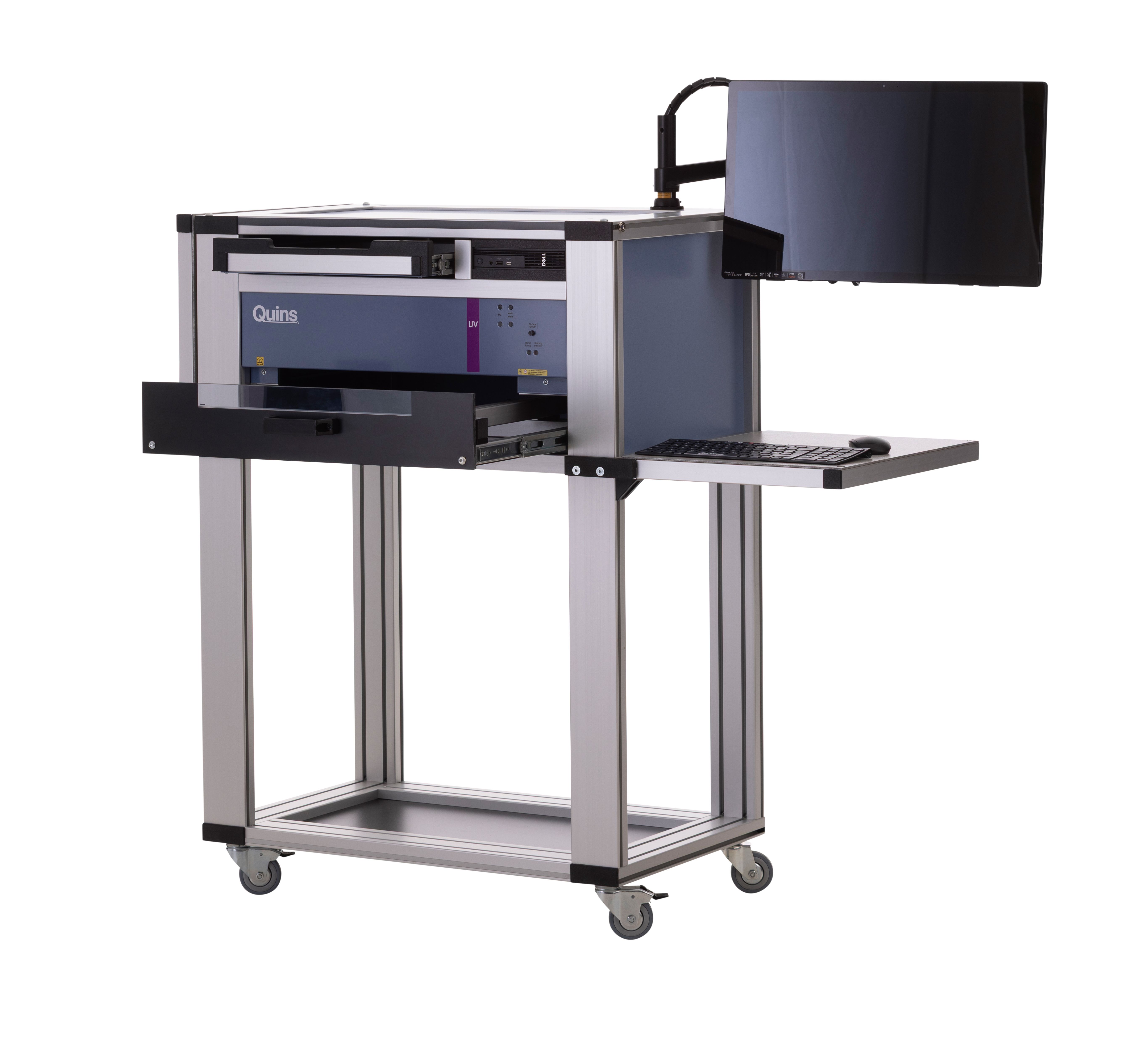
Quins Ultimate – Mobile Optical Inspection System for PCBs
Also available as HR or UV version
Quins Ultimate is a Mobile PCB Inspection System for circuit boards and electronic assemblies – the mobile all-in-one inspection station for first-article checks, SMT and THT assemblies, sample checks, series inspection and documented quality assurance.
Quins Ultimate is a mobile optical inspection system for PCBs and electronic assemblies. It combines image capture, illumination, computer and inspection software in one flexible, complete system.
Ready to inspect without extensive programming
Capture a reference and compare it directly using image-difference inspection – no lengthy programming process required.
Mobile and flexible to deploy
Standalone, on the company network, or right next to the production line – deployed exactly where the inspection station is needed.
Traceable inspection records
Inspection images, evaluations and results are documented and can be assigned to projects, orders or batches.
High-resolution image capture
Up to 1,200 dpi in the standard version, up to 4,800 dpi in the HR version for especially small structures.
Applications
Flexible optical inspection right on your production floor
Quins Ultimate combines image capture, illumination, computer and inspection software in one mobile, complete system. This means the inspection station can be used exactly where it is needed.
Typical applications:
Incoming goods inspection
Paste and placement inspection
First-article inspection
Set-up verification
SMT inspection
THT inspection
Solder joint inspection
Sample inspection
Series inspection
Outgoing goods and final inspection
Golden-board comparison
UV inspection of conformal coatings
The system is suitable for EMS providers, electronics manufacturers, PCB manufacturers, prototype builders, and educational and research institutions with a focus on electronics.
Defect detection
Which defects does Quins Ultimate detect?
Quins Ultimate supports inspection for optically visible deviations on PCBs, assemblies, components, solder joints, paste and coatings.
Component and placement defects
Missing or extra components
Wrong components
Rotated or reverse-polarity components
Shifted or tombstoned components
Bent pins
Visibly damaged components
Wrong PCB or assembly revision
Solder and paste defects
Solder bridges
Unsoldered or visibly faulty solder joints
Lifted leads
Missing solder paste
Too much or too little solder paste
Smeared paste
Paste bridges
PCB defects
Visible trace breaks
Traces too narrow or too wide
Incorrect, oversized or undersized drill holes
Deviations in solder mask
Contamination and visible damage
Conformal coating defects
With Quins Ultimate UV, the following deviations can be made visible, among others:
Missing conformal coating
Too little or too much coating
Coating splatter
Uneven coating
Bubbling
Deviations in conformal coating
The system inspects optically accessible features that are captured in the inspection image. Hidden solder joints or electrical function faults require complementary test methods.
How it works
How inspection with Quins Ultimate works
1. Capture reference
An approved assembly or golden board is captured and stored as the reference.
2. Identify the unit under test
The unit under test can be uniquely assigned to a project, order or batch, for example via a barcode.
3. Capture and compare the image
The system creates a reproducible image capture. Inspection is carried out manually via image-difference inspection or automatically with the appropriate software module.
4. Mark deviations
Deviations found are marked directly in the inspection image and can be forwarded to a repair station.
5. Document results
Inspection images, evaluations, repairs and further information are stored for documentation, statistics and traceability.
Variants
Quins Ultimate variants
Quins Ultimate is available in four versions – from the flexible standard version to the application-specific Tableau solution.
Variant
Application
Key feature
Quins Ultimate
Mobile visual inspection, golden-board comparison, first article, sample and series checks
Flexible standard version
Quins Ultimate UV
Inspection of conformal coatings and fluorescent coatings
UV technology
Quins Ultimate HR
Especially small structures, demanding inspection tasks
Resolution up to 4,800 dpi
Quins Ultimate Tableau
Special components, units under test or customer-specific processes
Application-specific Tableau solution
System comparison
Quins Ultimate or Quins Pro?
Quins Ultimate is the right solution when a fully integrated, mobile inspection station is needed. The system can be used flexibly between different workstations or production areas.
Quins Pro is particularly well suited to a stationary inspection station. For true line integration and special component-height requirements, other QUINS systems such as Quins Flex Line are available.
Features
Technical details
Dimensions
830 x 510 x 1950 mm (BxTxH)
Weight
55 kg
Image unit
CCD line scan camera (7,020 pixels/line)
Max. resolution
1,200 dpi, with -/HR up to 4,800 dpi
Effective pixels
71,6 Megapixel
Max. image size
430 x 320 mm
Max. component size
• 510 x 349 mm
Throughput height
• 50 mm (SMD/mixed assembly) • 60 mm (THT)
Scan speed
• 3.8 ms/line (color) • 1.3 ms/line (black and white)
Software and extensions for your inspection process
Quins Ultimate truly shines when used in conjunction with the appropriate QUINS software. Depending on the inspection task, the mobile all-in-one inspection station can be expanded to include functions for alternating image inspection, automated inspection, documentation, repair management, statistics, and data verification. This creates a tailor-made solution for your inspection process—from initial prototyping to documented production inspection. Translated with DeepL.com (free version)
For data control, setup support and preparation of inspection processes.
Frequently asked questions about Quins Ultimate
Quins Ultimate is an optical inspection system for PCBs and assemblies. Depending on the software configuration, inspection can be supported manually via image-difference inspection or through an automatic inspection process. For certain applications, the system can serve as a flexible alternative or complement to classic AOI systems.
For classic image-difference inspection, no extensive programming process is required. A reference is captured and then compared with the units under test.
The mobile system can be used directly alongside a line for first-article checks, sample inspections, set-up verification or fault analysis. Quins Flex Line is designed for automatic conveyor-based or full line integration.
The system is suitable for populated PCBs, SMT and THT assemblies, unpopulated PCBs, and other industrially manufactured components and molded parts, among others.
Units under test can be uniquely identified and assigned to the relevant projects, orders or batches. Inspection images and results can then be archived in a traceable way.
Yes. The Quins Ultimate UV version is designed for UV-visible conformal coatings and coating applications.
The standard version achieves up to 1,200 dpi. The HR version enables resolutions of up to 4,800 dpi.
Test the system with your own assembly
Experience Quins Ultimate under realistic conditions. In a personal demo, we'll inspect one of your assemblies together and show you which configuration fits your manufacturing and quality requirements.