Module for repair and rework

Quins Repair – Repair Station Software for PCBs and Assemblies

Quins Repair guides repair staff straight to defects that have already been detected. Defect and reference position, image capture, and available component information are displayed directly at the repair station. Repairs, partial repairs, pseudo defects, and rejects can be handled in a structured way and documented so they stay traceable.
Defect position · Reference image · Component information · Partial repair · Pseudo defect · Reject · Barcode function
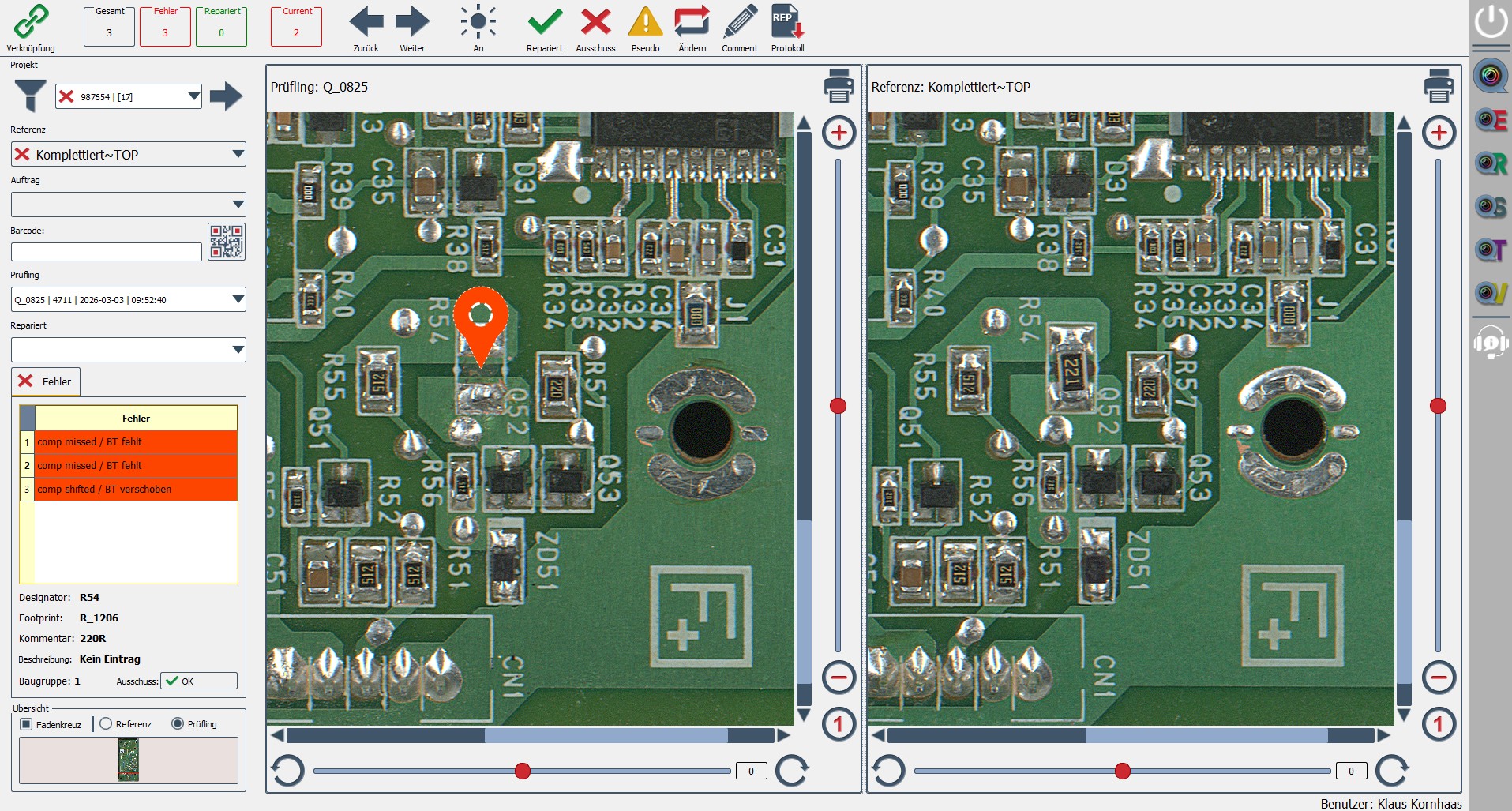
Repair station with Quins Repair software
Digital repair management

How QUINS Repair supports structured rework

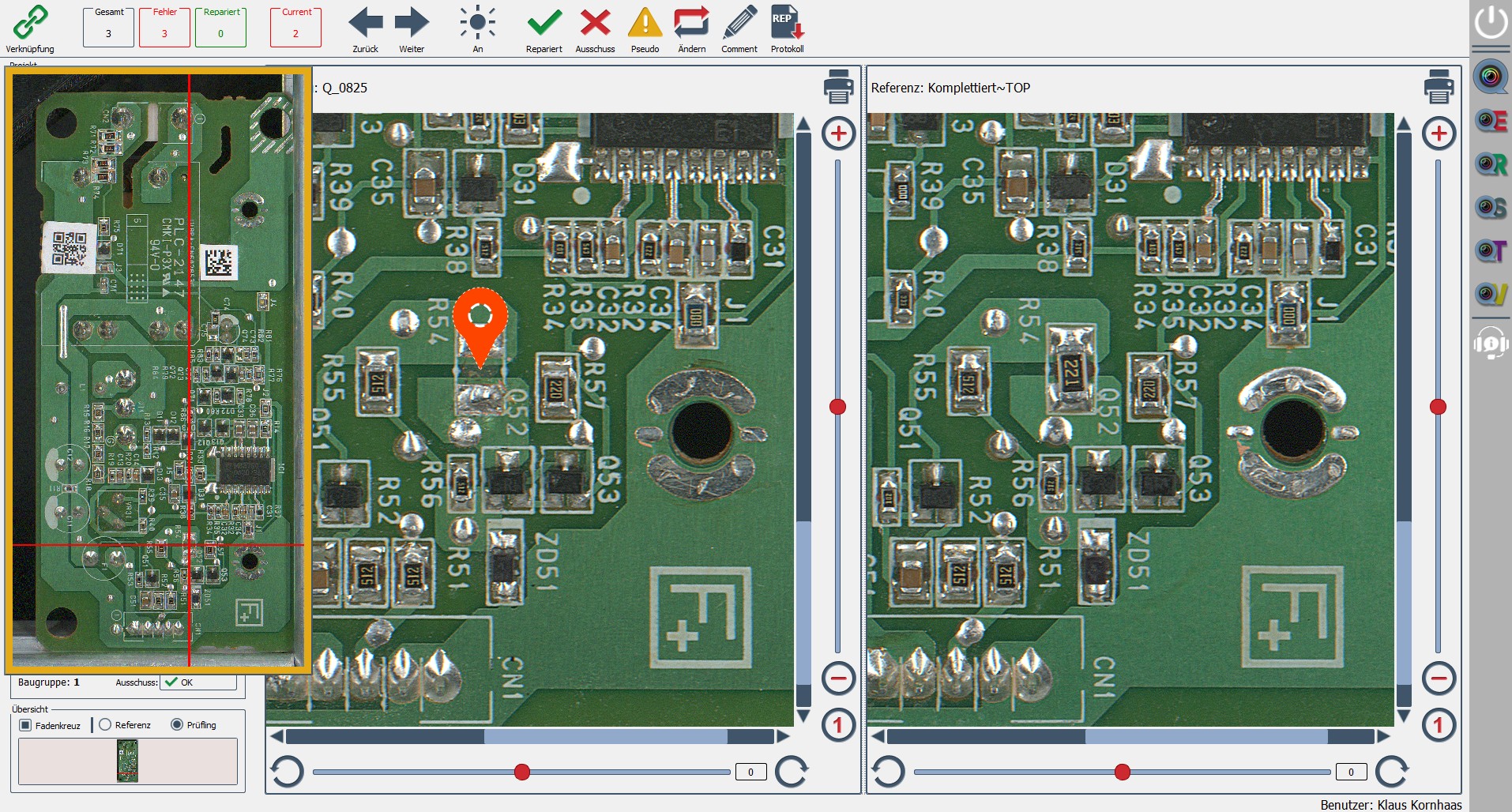
QUINS Repair supports structured rework of PCBs and assemblies by automatically transferring defects captured during inspection to the designated repair station. There, the operator receives all required information for processing, including defect position, reference position, defect image, component data, and current inspection status depending on system configuration.
QUINS Repair does not detect defects itself. The module takes over defects already captured in the QUINS inspection process – for example from Quins Easy, Quins Easy Plus, Quins AIP, or Quins UVI – and makes them available for structured rework and documentation.
Defect position and component information at the repair station
Suitable use cases

Which processes are a strong fit for QUINS Repair?

QUINS Repair is the right solution for manufacturers that want to manage and document structured rework of PCBs and assemblies digitally.
  • when SMT or THT assemblies require rework after inspection
  • when defect positions need to be visible directly at the repair station
  • when component details are required to complete repair and rework
  • when repairs, partial repairs, and rejects must be documented
  • when pseudo defects need clear and consistent classification
  • when repair processes should be evaluated with QUINS View or QUINS Statistics
  • when rework and quality assurance should be digitally connected
Rework workflow

From defect capture to documented rework

In many production lines, defects are first identified during inspection and then manually handed over to repair stations. During this handover, information is often lost or has to be searched again. QUINS Repair provides a digital workflow for structured rework, keeping the detected defect available at the repair station with image, position, component information, and status.
This reduces search effort, prevents information loss, and ensures repair decisions are documented in a traceable way.
Quality and traceability

Repair data for quality assurance and traceability

Every repair decision creates valuable data for quality assurance. QUINS Repair documents whether a defect was repaired, partially repaired, classified as a pseudo defect, forwarded for re-inspection, or marked as reject.
Together with QUINS View and QUINS Statistics, this data can be used for documentation, defect history, quality analysis, and full traceability of PCB and assembly rework.
Repair workflow

From detected defect to documented repair.

Quins Repair connects inspection and rework without media breaks. Every defect follows a clearly traceable path – from capture in the inspection process to a documented repair decision.

Capture the defect during inspection

A defect is marked with Quins Easy or Easy Plus, or reported automatically by an extension such as AIP or UVI.

Hand the defect to the repair order

The defect is assigned to the repair order together with the available project, image, and component data.

Identify the assembly

The operator calls up the assembly manually, via the order, serial number, or optionally by barcode.

Display the defect position

Quins Repair shows the affected position on the assembly and compares it against a reference position or reference image.

Repair and document the result

The operator repairs the position and classifies the outcome as repaired, partially repaired, pseudo defect, or reject. Depending on the process, a re-inspection or release follows.
Component information and repair status in Quins Repair
Visible at the repair station

What information does Quins Repair show?

Depending on the available project and inspection data, repair staff get all relevant information right at the workstation:
  • Defect position – the position of the marked defect is highlighted within the assembly image.
  • Reference position – comparison against a defect-free reference or golden board.
  • Defect image – the image captured during inspection helps locate and assess the deviation.
  • Component information – e.g. designator, part number, component description, footprint, comment, target position.
  • Repair status – open, started, completed, or forwarded for re-inspection.
  • Order and unit data – e.g. order number, project, serial number, inspection time.
Clear outcomes

Repair decisions, explained clearly.

Every processed defect is closed with a clear outcome. Only status values that actually exist in the relevant system configuration are used.

Repaired

The defect was fully repaired; the assembly can be forwarded for re-inspection or release.

Partial repair

Some of the marked defects have been repaired while other positions remain open.

Pseudo defect

The original report is classified as not an actual product defect and is assigned to a user and a timestamp.

Reject

The assembly or position is marked as not economically or technically repairable.

For re-inspection

Processing is complete; depending on the defined process, the unit must be checked again.
Typical applications of Quins Repair
Suitable for SMT and THT

Typical applications

Quins Repair supports rework across a range of production situations – provided the upstream inspection data and image information are available:
  • Repair station for SMT and THT assemblies
  • Defect handling after first article inspection
  • Rework following sample or serial inspection
  • Solder joint and component repair
  • Repair after UV inspection
  • Reject and complaint management
Modular system

Modular structure for inspection and rework processes

QUINS Repair takes over defects from QUINS Easy, Easy Plus, AIP, or UVI and can be connected with QUINS View for central documentation and QUINS Statistics for cross-process quality analysis.
Quins Easy softwareQUINS View softwareQUINS Repair softwareQUINS Statistics softwareQuins Tools software

QUINS Easy

The foundation for efficient visual inspection and structured inspection processes.

QUINS Easy Plus

For advanced inspection tasks, first article inspection, and optional automation features.

QUINS AIP

The automated inspection workflow supports standardized procedures and recurring checks.

QUINS UVI

For automated UV inspection, especially with conformal coating applications.

QUINS View

For automatic documentation and traceable inspection results.

QUINS Repair

For repair and rework with clear outcome classification and traceability.

QUINS Statistics

For analysis, KPIs, and quality trends based on inspection data.

QUINS Tools

For data checks, setup support, and preparation within inspection workflows.
Module comparison

Inspect, repair, or analyze – which QUINS module fits your process?

Function QUINS Repair QUINS View QUINS Statistics
Process a single defect ✓ Yes No No
Show defect position ✓ Yes depends on stored data No
Document repair decisions ✓ Yes display centrally No
Order and repair history repair-related central and cross-process aggregated
Analyze defect frequency and trends limited No ✓ Yes
Yield and quality trends No No ✓ Yes
Quins Repair is the right extension when defects that have already been detected need to be handed to a digital repair station, processed there, and closed out in a traceable way.
FAQ

Frequently asked questions about QUINS Repair

Experience Quins Repair with your own repair process.

Experience with QUINS inspection systems since 1992
Developed and supported in Germany
Inspection and repair software built to work together
Quins Pro System